
Python has always been the language of simplicity, but with the recent boom in generative technology, the way we write it is changing forever.
Instead of spending hours scrolling through documentation for the right library or debugging a tricky list comprehension, developers are now using intelligent assistants to handle the heavy lifting.
If you are looking for the best AI for python code generation, you are in the right place.
I have curated a list of the 20 most capable tools available today that offer generous free tiers for individual developers and students.
At MrRama.com, we focus on helping you leverage these modern technologies to build better projects faster.
Why Python is the Perfect Language for AI Generation
Python’s clean, readable syntax makes it the ideal candidate for machine learning models.
According to the 2026 Stack Overflow Developer Survey, nearly 84% of developers have integrated AI tools into their daily workflows, with Python being the most supported language across almost every platform.
Because Python relies on standard indentation and clear naming conventions, AI models can predict the next logical step in your code with high accuracy.
The Top 20 Free AI Tools for Python Code Generation
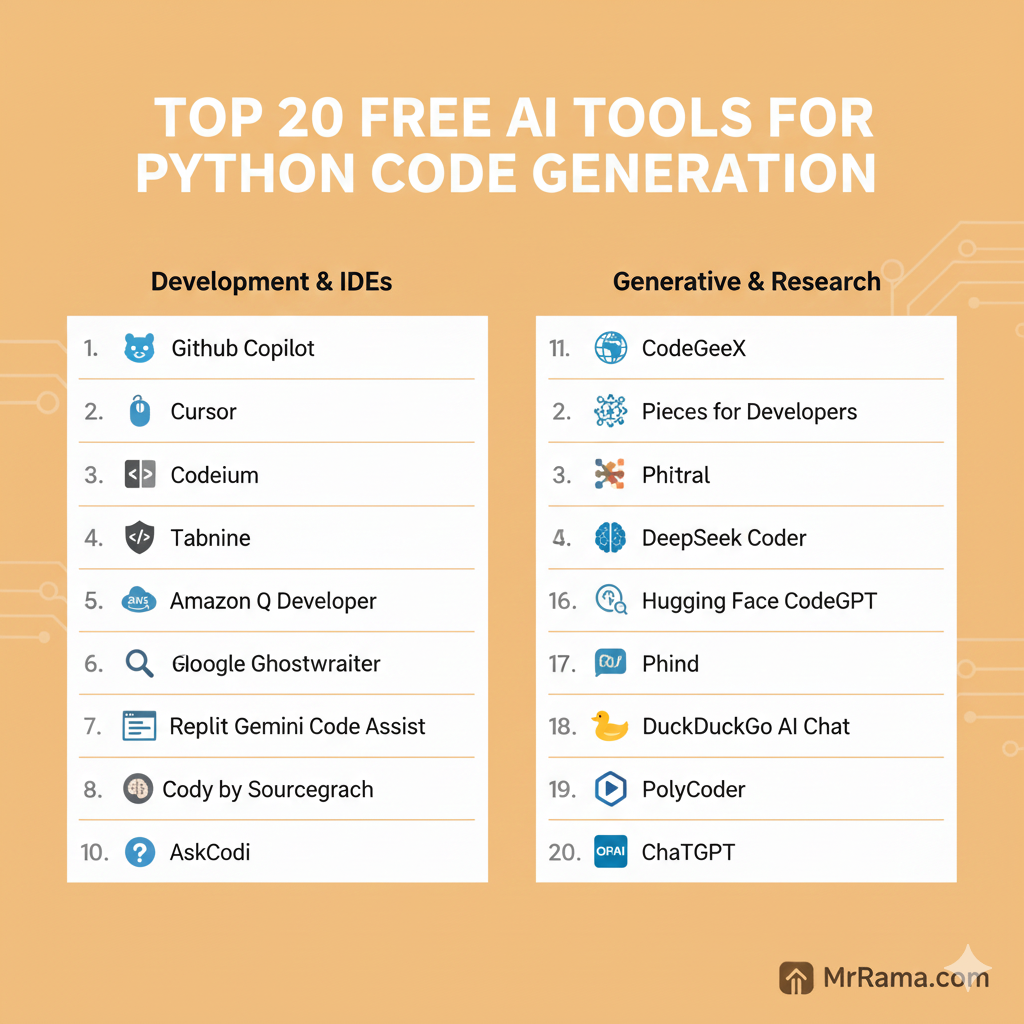
1. GitHub Copilot (Free for Students and Open Source)
GitHub Copilot remains the gold standard for many, even as competitors emerge.
While it is a paid tool for most, it is completely free for verified students, teachers, and maintainers of popular open-source projects.
You can find it at github.com/features/copilot and integrate it directly into your VS Code or PyCharm editor.
2. Cursor (Free Tier Available)
Cursor is not just a plugin; it is a fork of VS Code built from the ground up to be an AI-native editor.
It allows you to “chat” with your entire folder structure, making it one of the best tools for AI for python code generation when you need the model to understand how your main.py interacts with your utils.py.
Download it for free at cursor.com to experience the generous free tier for individual developers.
3. Codeium (Free for Individuals)
Codeium has gained a massive following because its individual plan is “free forever.”
It offers lightning-fast autocomplete and a chat sidebar that rivals Copilot in quality.
Visit codeium.com to install the extension and start indexing your local Python files for more accurate suggestions.
4. Tabnine (Free Basic Version)
Tabnine was one of the first players in the AI coding space, and it excels in privacy.
The free version provides basic “all-language” autocompletions that run locally on your machine.
Check out tabnine.com if you work on sensitive projects and want to keep your data off cloud servers.
5. Amazon Q Developer (Free Tier)
Formerly known as CodeWhisperer, Amazon Q Developer is AWS’s answer to AI coding.
It is particularly powerful if you are writing Python code for cloud infrastructure, such as AWS Lambda functions.
The free tier is available at aws.amazon.com/q/developer and includes unlimited code suggestions and security scans.
6. Blackbox AI
Blackbox AI is famous for its “code search” capability and its ability to turn any natural language prompt into a functional Python script.
It integrates with over 20 IDEs and offers a very responsive free web-based generator.
Find out more at blackbox.ai to quickly generate boilerplate code for web scrapers or data processing.
7. Replit Ghostwriter (Free for Replit Users)
If you prefer coding in your browser, Replit is the place to be.
Their Ghostwriter AI is deeply integrated into the Replit environment, allowing you to generate, explain, and debug Python code without ever leaving your tab.
Try it out at replit.com for rapid prototyping and educational purposes.
8. Google Gemini Code Assist
Google’s Gemini model has a massive context window, which is a game-changer for Python developers.
You can feed it a massive Python library or a long documentation file, and it will generate code based on that specific context.
Start using it through gemini.google.com or the Google AI Studio for complex logic generation.
9. Cody by Sourcegraph
Cody is an AI assistant that understands your entire codebase.
It uses Sourcegraph’s powerful search engine to look through your repositories and provide context-aware Python suggestions.
Get Cody for free at sourcegraph.com/cody to link your repositories to an intelligent assistant.
10. AskCodi
AskCodi provides a suite of tools including a code generator, a unit test creator, and a documentation assistant.
It is built on top of OpenAI’s models but tuned specifically for developer productivity.
Register at askcodi.com to start using your free monthly credits for your hobbyist projects.
11. CodeGeeX
CodeGeeX is a large-scale multilingual code generation model that is completely open-source.
It has an extension for VS Code that offers free, high-quality Python code completion.
Learn more at codegeex.cn and explore how it handles niche Python frameworks.
12. Pieces for Developers
Pieces is more of a “workflow assistant” than a pure generator.
It helps you save, enrich, and reuse Python snippets that the AI generates for you.
Visit pieces.app to install the copilot that explains complex Python decorators in plain English.
13. DeepSeek Coder
DeepSeek has recently taken the AI world by storm with its high-performance, low-latency models.
Their coder model is specifically optimized for logic and math, making it a favorite for Python data scientists.
Try the free web chat or API at deepseek.com for math-heavy Python logic.
14. Hugging Face CodeGPT
Hugging Face is the heart of the open-source AI community.
Their CodeGPT extension allows you to use various open-source models (like StarCoder) for free.
Explore the possibilities at huggingface.co and choose the model that fits your specific needs.
15. Phind
Phind is a search engine designed specifically for developers.
It doesn’t just give you links; it generates a full Python solution based on the latest information from the web.
Go to phind.com when you are using a brand-new Python library that other AIs might not know yet.
16. Mistral Codestral
Mistral’s Codestral is a heavyweight in the world of open-weight models.
It is exceptionally good at “Fill-in-the-Middle” tasks, which is what powers the best autocompletes.
Access the trial at mistral.ai and integrate it with your favorite IDE for high-speed completions.
17. DuckDuckGo AI Chat
For a privacy-focused experience, DuckDuckGo now offers a chat interface that allows you to access GPT-4o or Claude 3 for free.
It is a great way to generate Python snippets without your data being used to train the models.
Head over to duckduckgo.com/?q=DuckDuckGo+AI+Chat for a simple, no-account experience.
18. Warp AI
If you spend a lot of time in the terminal, Warp is a must-have.
It is a modern terminal that has AI built into the command line.
Download it at warp.dev and ask it to write Python scripts directly in your shell.
19. PolyCoder
PolyCoder is an open-source model trained on a massive 249GB codebase.
While it is more of a research-oriented tool, it is one of the few models that can be run locally for free if you have the hardware.
Check the GitHub repository for PolyCoder to learn how to host your own local AI generator.
20. ChatGPT (GPT-4o mini)
We cannot talk about AI without the original.
The free version of ChatGPT now uses GPT-4o mini, which is incredibly competent at Python.
Log in at chatgpt.com for explaining concepts, refactoring code, and brainstorming application architecture.
Expert Insight: How to Get the Most Out of AI Tools
“The secret to using AI for Python isn’t about the tool itself; it’s about the context you provide. An AI is only as good as the prompt you give it.”
When using AI for python code generation, follow these three rules:
- Be Specific: Instead of saying “make a plot,” say “create a Matplotlib line chart with a dark theme and labeled axes.”
- Modularize: Ask the AI to write one function at a time rather than an entire 500-line script.
- Verify: Always run your code. AI can “hallucinate” library methods that don’t exist.
If you are a student working on AI-based college projects, these practices will help you build much more reliable systems.
Frequently Asked Questions
Which AI is best for Python coding?
For most developers, Cursor or GitHub Copilot are the best options because they have the deepest integration with the coding environment.
Can I use AI to learn Python for free?
Yes. Tools like ChatGPT and Phind are excellent for explaining why a certain piece of code works, which is often more helpful than just getting the answer.
Is AI-generated Python code safe to use?
Generally yes, but you should always review it. AI can sometimes suggest outdated libraries or code with security vulnerabilities.
Does AI replace Python developers?
No. AI is a “force multiplier.” It handles the repetitive boilerplate, allowing developers to focus on high-level architecture and creative design.
Can AI write complex Python algorithms?
AI is great at standard algorithms. However, for unique business logic or highly specialized math, it requires heavy human guidance.
Which free AI tool has the best Python autocomplete?
Codeium is widely considered to have the best “free forever” autocomplete for individual developers in 2026.
How do I prompt an AI for Python code?
Start with the goal, define the libraries you want to use, and specify the input/output formats.
Do these tools work offline?
Most require an internet connection. However, tools like Tabnine and local models via PolyCoder can run entirely offline.
Conclusion
The landscape of AI for python code generation is shifting rapidly, providing developers with more power than ever before.
Whether you are a student just starting with your first “Hello World” or a senior engineer, there is a free tool on this list for you.
The key is to experiment. Try a few of these tools perhaps start with Codeium or Cursor and see which one fits your personal coding style.
Explore more guides on MrRama.com to learn how AI can simplify your data workflows and development tasks.